On-Page Structure (Teen Ed.)
Welcome
This page explains how correctly structured headings (H1-H5) and image ALT-Text help search engines understand and surface high-quality content.
Important
The arrival of AI in search has fundamentally changed the landscape, turning search engines into "data-vending machines."
To succeed in this new era of AI in search, your site should adopt a dual strategy:
- Feed Data To The Search Engine: Provide clear, structured DATA. Use precise page headers and ALT tags to ensure the AI can easily parse and serve your facts.
- Win the Human: Once you have gotten the attention and ranking of the search engine, move forward to share your unique touch and deep expertise in the niche topic. Sharing LOVE for what you are doing is the single last moat that AI can not cross.
Page Structure Basics: How to Use H1–H5
Is it necessary for H1–H5 tags to point out specific data points? 100% Yes. But in 2026, "Data" isn't just a spreadsheet; it is your take and personal experience. Using a header like "Why I switched to Mirrorless Cameras" is a data point of Information Gain. It signals to AI that this content is a "Hidden Gem"—first-hand, human experience that hasn't been scraped from a manual.
- Data as Personal Experience: A header like "Why I switched to Mirrorless Cameras" is a data point. It signals to AI that this content is "Hidden Gem" material—first-hand, human experience that hasn't been scraped from a manual.
- The Ranking Edge: When you anchor your personal "takes" under clear H2s and H3s, you tell Google: "Here is a specific, unique insight you won't find anywhere else."
H1: Pick One Main Idea That Tells Bots and People What Your Page Is About
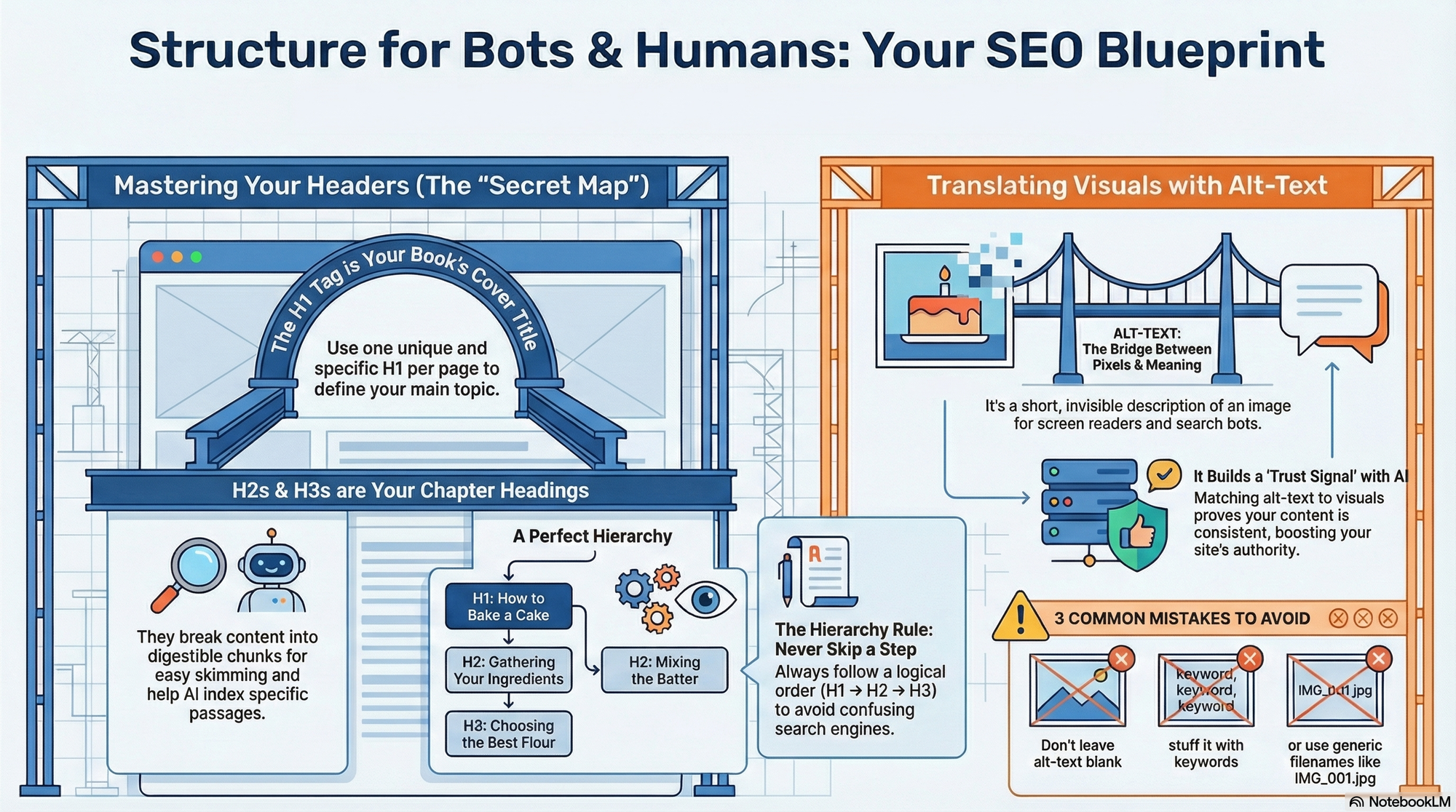
Think of the H1 tag as the title on the front cover of your book. You only get one per page, so it needs to be definitive.
- Be Specific: If your H1 is just "Games," the computer doesn't know if you’re talking about Minecraft, the Olympics, or board games. An H1 like "The Best Strategy Games for Mac in 2025" gives search engines a perfect map.
- The "Anchor" Effect: The H1 tells the AI exactly what the main topic is. This helps the computer group your page with other high-quality, relevant info, instantly boosting your perceived expertise.
H2 & H3 Tags: Break Your Topic Into Skimmable Chapters
If the H1 is the book title, H2s and H3s are your chapter headings. They break your big ideas into "chunks" that are easier to digest.
- Passage Indexing: Google is now smart enough to rank specific sections of your page. If a user searches "how to charge an EV battery at home" and you have an H2 with that exact title, Google can send the reader directly to that section.
- Winning the "AI Overview": Those helpful answer boxes at the top of search results? They are often pulled directly from text sitting under a clear, descriptive H2 or H3.
Don’t Skip a Step!
When you're building a website, your headers (H1, H2, H3) are like steps on a staircase. Skipping heading levels is not best practice.
Example of what to do:
H1: The Page’s Main Topic (used once per page)
- You want the reader to know at once what your page is about.
H2: A Major Section of the Topic
- You are expanding and explaining the main idea.
H3: A Specific Idea or Subtopic Inside That Section
H2: The Next Major Section of the Topic
H3: A Specific Idea Inside That Section
H4: A Finer Detail or Example Supporting That Idea
H3: Another Specific Idea Inside the Same Major Section
H2: Another Major Section of the Topic
On-Page Structure: Smart Checks Most People Forget
Hidden Factor: Clear main topic
Hidden Factor: Helpful headings
Hidden Factor: Internal links
Let’s Talk About Naming (Image) ALT-Text
Alt text (alternative text) is a short written description that explains what an image means, not just what it looks like. Its job is to turn a visual into language so that people and machines can understand it. Good alt text captures the purpose, function, or message of an image in a way that still makes sense even when the image itself is not visible.
This matters because the web is not only visual. Screen readers rely on alt text to describe images to users who cannot see them, and search systems rely on it to understand what an image represents. In both cases, alt text becomes the bridge between pixels and meaning — it connects what is shown to what is understood.
Side note — accessibility in a nutshell:
Alt text is a core requirement for accessible web content. It ensures that blind and visually impaired users can perceive information that would otherwise be lost. Accessibility guidelines like the WCAG (Web Content Accessibility Guidelines) explicitly require meaningful alt text for non-decorative images. If you want to learn more, see:
- WCAG on non-text content: https://www.w3.org/WAI/WCAG21/Understanding/non-text-content.html
- WebAIM on alternative text: https://webaim.org/techniques/alttext/
- Harvard accessibility guide: https://accessibility.huit.harvard.edu/describe-content-images
Back to naming: writing good alt text is an act of translation. You are not labeling the image; you are explaining what matters about it. That means ignoring decoration, color, or style unless those details are essential to the meaning.
Ask yourself: If the image disappeared, what information would be missing? The answer to that question is what your alt text should contain.
What Is the Bridge Between Pixels and Meaning?
- The Narrator: For someone using a screen reader, Alt-text is the only way they can understand your visuals. Without it, the device might simply say "image" or read a cryptic file name like
IMG_592.jpg. Descriptive Alt-text ensures your content is accessible to everyone. - Building Trust: Search engines like Google use AI to compare your text to your visuals. If you feature an image of a "Blue Pro-Gamer Mouse" and your Alt-text describes exactly that, the AI confirms your content is consistent. This alignment creates a Trust Signal, increasing your site’s authority.
- The "Second Door" to Traffic: Google Images is a massive search engine. Descriptive Alt-text allows your images to rank independently, giving users a second way to discover your blog.
Common Structure Mistakes That Confuse AI and Humans
To ensure your images help your rankings rather than hurt them, stay away from these common pitfalls:
- Using Generic File Names: Leaving names like
IMG_001.jpgtells search systems nothing about what the image contains. - Keyword Stuffing: Write for humans, not just robots. Forced keywords reduce clarity and usefulness.
- Stating the Obvious: Avoid phrases like “image of” or “picture of,” since assistive technologies already indicate the presence of an image and the extra words waste space.
- Leaving It Blank: Leaving alt text empty on an image that carries meaning removes that information entirely for screen-reader users and makes the image invisible to systems that rely on text to understand visuals. Only leave alt empty (
alt="") when the image is purely decorative or structural, such as background textures, separators, or design flourishes. - Less Is (Generally) More: Keep alt text concise — I choose about 190 characters. See more: https://www.section508.gov/create/alternative-text/
Important:
This page is an overview — a starting point, not the whole story.
As you advance, you’ll discover that fine-tuning a page often means working with its source code, especially when adding structured data. That’s where meaning becomes explicit.
Here’s a little for the road ...
Structured Content: Turning Meaning into Something Machines Can Read
1. When people read a web page, they use context, experience, and intuition to understand what something means. Machines don’t have that luxury. They don’t infer — they parse. Structured content exists to make meaning explicit instead of implied. It’s the difference between hoping a system understands your page and telling it what your page actually is.
2. This is where structured data comes in. Structured data is a standardized way of describing content using a shared vocabulary, most commonly Schema.org. It lets you declare facts like “this is an article,” “this is the author,” “this is a product,” or “this is a review” in a format machines can reliably interpret.
3. Search engines use this layer of meaning to reduce ambiguity. Without structured data, they have to guess based on patterns. With structured data, you explicitly describe relationships: who created something, what kind of thing it is, what it’s about, and how its parts connect. That makes interpretation more accurate and reuse safer.
Note: Structured data can enable rich results, but it does not guarantee Google will show them.
4. Structured data does not change how your page looks. It doesn’t affect design, layout, or style. It lives in the source code and quietly adds clarity underneath the visible content. If structure is the grammar of your page, structured data is the dictionary.
5. The most common format for structured data on the web today is JSON-LD, a lightweight syntax that can be embedded directly into a page’s HTML. Google recommends JSON-LD because it’s clean, separate from the visual markup, and easy to maintain. You can read Google’s overview here:
https://developers.google.com/search/docs/appearance/structured-data
6. Structured content is not about gaming algorithms. It’s about honesty. When you declare that something is an article, a person, an organization, or a product, you are reducing the risk of misunderstanding. That protects users, systems, and you.
7. This becomes especially important as content is reused across devices, assistants, summaries, and previews. Your page is no longer just a page — it’s a data source. Structured content helps ensure that what gets extracted from your page still reflects your intent.
8. Not everything needs structured data, and not everything benefits equally. But content with relationships almost always does: articles with authors, products with prices, events with dates, or instructions with steps. These are all places where explicit meaning prevents confusion.
9. Structured content is also future-proofing. As systems evolve, they rely more on meaning and less on pattern matching. Pages that clearly declare what they are will age better than pages that rely only on clever wording or formatting.
10. In short: structured content is how you move from writing for today’s readers to communicating with tomorrow’s systems. It doesn’t replace good writing or good structure — it completes them.
Frequently Asked Questions
Why does structure matter if the content is already good?
Because without structure, good content is just a long stream of words. Structure is what turns content into a map — it lets both people and machines see where ideas begin, relate, and end.
Is structure a ranking factor or an understanding factor?
It’s an understanding factor. Structure doesn’t make content better — it makes content legible. Without legibility, relevance can’t be recognized.
What is the difference between organizing for humans and organizing for machines?
Humans can guess meaning from context. Machines need meaning to be explicit. Good structure is where those two needs meet.
Can structure compensate for weak content?
No. Structure can clarify meaning, but it cannot create it. If the idea is empty, structure only makes the emptiness more visible.
Why do headings matter more than formatting like bold or font size?
Because headings describe relationships between ideas. Formatting only changes appearance; structure changes meaning.
How does a machine know what a page is “about”?
By looking at the hierarchy of topics: the main topic, the major sections, and the supporting details. That hierarchy is communicated through headings and semantic markup.
Why is “describing purpose” better than “describing appearance” for images?
Because purpose tells you why the image exists. Appearance only tells you what it looks like — which is often irrelevant to understanding the message.
What is the biggest mistake people make with structure?
They treat it as decoration instead of language. Structure is not styling — it is syntax.
Does more structure always mean better structure?
No. Too much structure can fragment meaning. The goal is clarity, not complexity.
Why do different systems (Google, Bing, screen readers) all care about structure?
Because structure is the only shared language that works across humans, machines, and assistive technologies.
Is this only relevant for large or commercial websites?
No. It matters even more for small or educational sites, because structure is often the only navigation and explanation the reader has.
If structure is so important, why is it often ignored?
Because it’s invisible when it works. You only notice structure when it’s missing.
What is the simplest way to tell if a page is well structured?
Read only the headings. If the story still makes sense, the structure is doing its job.
Is structure about control or about clarity?
Clarity. Structure doesn’t force meaning — it reveals it.
What does “good structure” feel like to a reader?
Effortless. You don’t feel guided — you just never feel lost.
📘 Outbound Resources
- How Search Works (Google) — High-level explanation of discovery, understanding, and ranking.
https://www.google.com/search/howsearchworks/ - HTML Living Standard — Headings (
h1–h6) — The formal definition of heading elements and their role in documents.
https://html.spec.whatwg.org/multipage/sections.html#the-h1,-h2,-h3,-h4,-h5,-and-h6-elements - MDN — Heading Elements Reference — Practical reference for heading usage in browsers.
https://developer.mozilla.org/en-US/docs/Web/HTML/Element/Heading_Elements - HTML Living Standard — The
imgelement andaltattribute — The formal definition of image semantics.
https://html.spec.whatwg.org/multipage/embedded-content.html#the-img-element - Google Image Guidelines — How images are interpreted and displayed.
https://developers.google.com/search/docs/appearance/google-images - MDN — HTML Semantics — How meaning is encoded into markup.
https://developer.mozilla.org/en-US/docs/Glossary/Semantics