Why Canonical Tags Matter (Teen Ed.)

Imagine you are writing a massive history paper for your final grade. You work hard on it, but when you go to print it, your printer goes haywire. It spits out three slightly different versions of the same essay. If you handed all three versions to your teacher, they would be totally confused.
Your teacher might just pick one at random to grade, or worse, they might think you are disorganized and give you a lower grade. This exact situation happens to search engines every single day. Search engines crawl websites and often find multiple pages that look almost exactly the same. They don't know which version should be shown to people searching online. When search engines get confused like this, it can hurt your website.
If Google, Bing, or other search engines do not know which page is the most important, they might pick the wrong version instead of the perfect one you wanted everyone to see. That is where the canonical tag comes in to save the day.
Think of the canonical tag like a bright sticky note you put on the front of your best history paper that says, "Teacher, please grade THIS one!" It clears up the confusion instantly.
Here is an example:
<link rel="canonical" href="https://palo-alto-seo-blog.search-engine-optimization.org/why-canonical-tags-matter-teen-edition/">
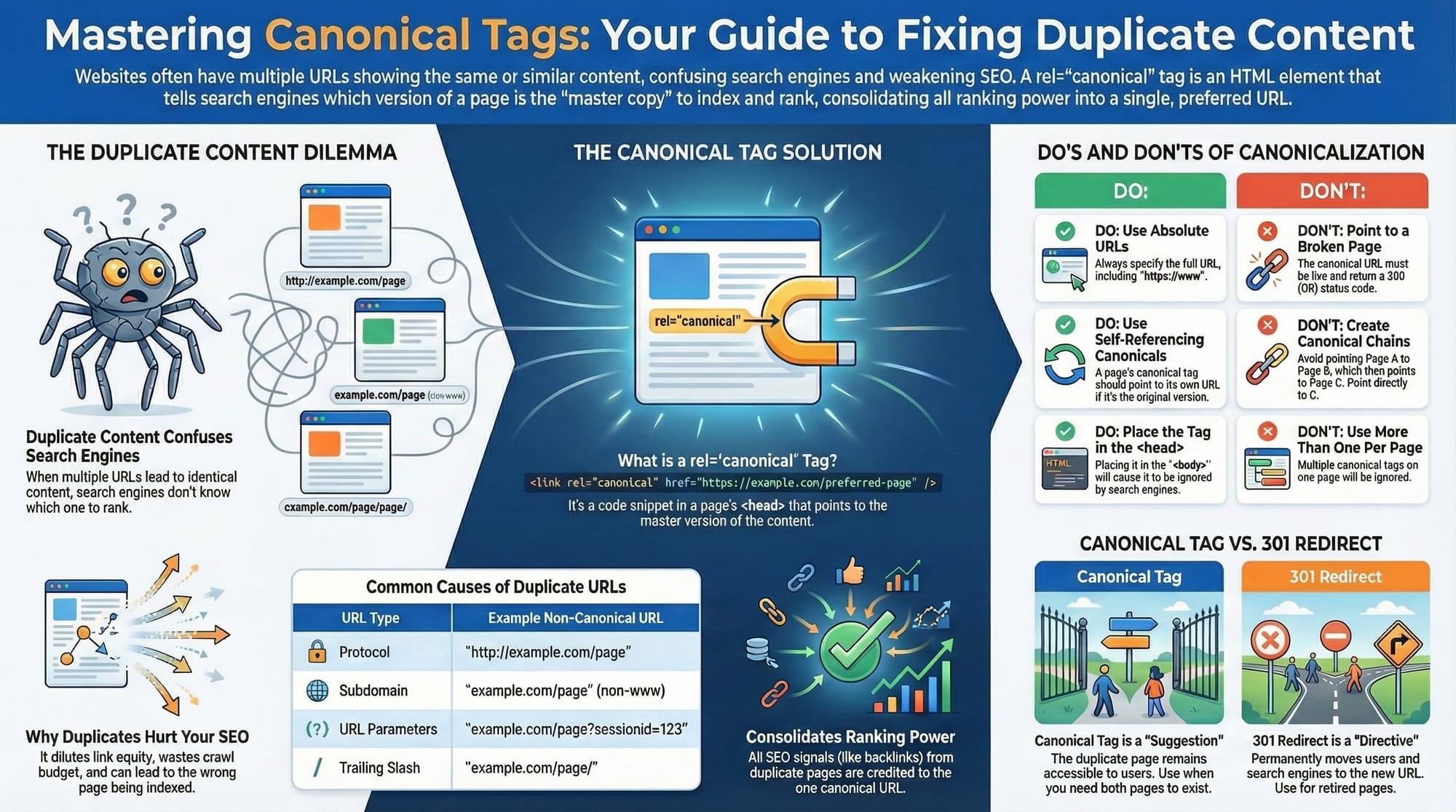
The tag is placed in the head section of your site's source code. It lives in the background of your website and tells Google and other search engines which version of a page is the master copy that deserves all the credit.
According to Google Search Central, this tag is essential for helping Google understand your site structure. It stops bots from wasting time looking at duplicate stuff over and over again, which makes them much happier with your website.
(Wait, what is a bot? Think of a bot—also called a "crawler" or "spider"—like a digital explorer sent by Google. It travels across the internet 24/7, visiting billions of pages to figure out what they are about. It reads your text, looks at your images, and follows your links so it can file your page away in Google's massive library.)
You might be thinking, "But I didn't create duplicate pages!" The tricky thing is that duplicates often happen by accident. You usually don't even know they are there until they start causing problems for your SEO.
For example, think about an online store that sells T-shirts. You might have a page for a "Cool Blue Shirt." But that same shirt might also appear in the "Men's" category and the "New Arrivals" category. To a search engine, these look like three different pages, even though they show the exact same shirt.
Another common cause of accidental duplicates is tracking links. Have you ever clicked a link in an email and seen a bunch of weird code at the end of the URL, like ?utm_source=newsletter? That code tells the website owner you came from an email, but it also creates a "new" URL that looks unique to Google.
There are also "printer-friendly" versions of articles. You want your users to be able to click a button and get a clean version of your story to print out. But you definitely don't want Google to rank that boring text version higher than your beautiful, colorful main article.
When you have all these duplicates, you waste what SEO experts call "crawl budget." Google's bots only have a certain amount of time to spend on your site. If they spend all their time reading your printer-friendly pages, they might miss your new, important content.
This confusion creates a Duplicate Content issue. As Moz explains, duplicate content forces search engines to choose between the different versions. They rarely choose well, and your website's traffic can drop because the right pages aren't showing up.
But the canonical tag does more than just fix confusion; it also acts like a power-up for your website. In the world of SEO, we talk about something called "ranking power" or link equity. You can think of this like votes in an election.
Imagine if three different friends wanted to vote for you for Class President. But when they wrote your name on the ballot, one wrote "Mike," one wrote "Michael," and one wrote "Mikey." If the election rules were super strict, those three votes might not count together. You would have three separate piles of one vote each, instead of one big pile of three votes.
In the same way, if you have three duplicate pages, the links (votes) pointing to them get split up. This is often called "cannibalization." Your pages end up competing against each other, and none of them get enough votes to win the top spot in search results.
The canonical tag fixes this by consolidating your votes. It tells Google, "Hey, count the votes for 'Mike,' 'Michael,' and 'Mikey' all toward this one main person." It combines your power into a single, strong signal.
This concept of Link Equity is vital for ranking high. By using the tag, you ensure that every bit of credit your content earns is focused on one URL, giving it the best possible chance to be number one, as described in this guide on link equity.
However, there is a very important catch you need to understand. The canonical tag is a suggestion, not a directive. It is not a military order that Google must obey. It is more like a polite request or a strong hint.
Going back to our school analogy, it’s like asking your teacher to grade a specific draft. Most of the time, they will listen to you. But if that draft is ripped, stained with coffee, or incomplete, the teacher might ignore your note and grade the other clean copy instead.
Google reserves the right to ignore your canonical tag if it thinks you made a mistake. If you point the tag to a page that doesn't exist (a 404 error - see: https://en.wikipedia.org/wiki/404_page) or a page that has totally different content, Google will make its own decision about what to rank.
You might be wondering how this is different from a 301 Redirect. People often get them mixed up because they both deal with moving traffic or credit from one place to another, but they are very different tools. (Related: https://developers.google.com/search/docs/crawling-indexing/301-redirects).
Think of a 301 Redirect like moving houses. When you move, you fill out a form at the post office to permanently forward your mail. Anyone who goes to your old house is automatically sent to your new one. They never even see the old house.
You use a 301 Redirect when you want a page to disappear forever and be replaced by a new one. It is a permanent change. The old page is gone, and users are forced to the new location instantly.
A canonical tag is different because both pages still exist. You use it when you want the "duplicate" page to stay live for users to see, but you want Google to ignore it. The printer-friendly page is the perfect example: you want people to use it, but you don't want it to be your main search result.
Semrush breaks this down clearly. They explain that you should use redirects for permanent moves and canonical tags for managing duplicates that need to stay online. Using the right tool for the job is a hallmark of a pro.
So, how do you actually use this powerful tool? It’s surprisingly simple to implement. You don't need to be a computer genius, but you do need to be precise. The tag is just a line of code that you add to your website.
You place this code in the <head> section of your webpage's HTML. This is the top part of the code that loads before the visible content. If you put it in the <body> (the main part of the page), Google will likely ignore it completely.
The code looks like this: <link rel="canonical" href="https://yourdomain.com/preferred-page/" />. It’s short, but every character matters. If you make a typo, the whole thing breaks.
A golden rule of canonical tags is One Tag Per Page. You cannot have two different canonical tags on the same page. That would be like putting two different "Grade Me" sticky notes on your paper pointing to different drafts. The teacher (Google) will just get confused and ignore both.
When writing the URL inside the tag, you must use Absolute URLs. This means writing out the full web address, starting with https://. Do not use shortcuts or partial addresses.
Think of this like giving someone directions. If you just say "Turn left," they might get lost depending on where they are standing. But if you give them the exact GPS coordinates, they will arrive at the exact right spot every time.
Using the full https:// address also protects you from content thieves. Sometimes, "scraper" sites will copy your website's code to steal your content. If you use a relative link (like /my-page), their site will look for the page on their server.
But if you use an absolute URL (like https://mysite.com/my-page), even if they steal your code, the canonical tag will still point back to your website. You essentially trick the thieves into telling Google that you are the original author! Google Search Central highly recommends this strategy.
Another best practice that sounds weird at first is the Self-Referential Tag. This is when a page has a canonical tag that points to itself. It’s like wearing a nametag that says "Me" on it.
Why would you do that? Because the internet is a messy place. As we mentioned earlier, links to your site often get weird tracking parameters added to them by social media sites or newsletters.
To a computer, example.com and example.com/?source=facebook look like two totally different pages. By putting a self-referential tag on example.com that points to example.com, you are building a shield.
This shield tells Google, "No matter what weird tracking codes get added to the end of my link, THIS clean URL is the only one that counts." Yoast's guide emphasizes that this is a critical safety net for your SEO.
You also need to be careful with JavaScript. Modern websites love using JavaScript to load content dynamically. However, relying on JavaScript to insert your canonical tags can be risky.
Google is smart, but it reads the basic HTML of your page first. Then, it comes back later to render the JavaScript. If your canonical tag only appears after the JavaScript loads, Google might miss it during the first pass.
It is always safer to "hard-code" your canonical tags directly into the HTML. This ensures they are visible to Googlebot the very first instant it arrives on your page, as noted in Google's JavaScript SEO basics.
If your website goes global, you have another layer to consider: International SEO. If you have a site for the US and a site for Canada, the content might be almost identical, just with different shipping info.
You use something called hreflang tags to handle the languages, but you still need canonical tags. The mistake people make is pointing the Canadian page's canonical to the US page. Do not do this!
Each language version should point to itself. The Canadian page is the master for Canada; the US page is the master for the US. Google's guide on localized versions explains that messing this up can cause your Canadian page to disappear from Google entirely.
Finally, you must avoid Canonical Chains. This happens if you point Page A to Page B, and then you point Page B to Page C. It’s like sending a delivery driver to three different houses to drop off one pizza.
Google hates this. It wastes their time and dilutes your ranking power. You should always update your tags so that Page A and Page B both point directly to Page C. Keep the path simple and direct.
To make sure you did everything right, you should use Google Search Console. It has an "Index Coverage" report that shows you exactly how Google is treating your tags. It will tell you if they accepted your suggestion or if they chose a different page instead.
Mastering canonical tags is like being the most organized student in class. It cleans up your mess, ensures you get full credit for every vote, and helps the teacher understand exactly what you are trying to say. It’s a small line of code with a massive job.
TOP
Frequently Asked Questions
Can I use them for different domains? Yes, you can use a "cross-domain canonical" to point from one website to another. However, if you are letting someone else publish your article (syndication), Google now recommends using a noindex tag instead. This is safer because sometimes Google ignores the canonical tag if the two websites look too different.
Is a canonical tag the same as a 301 redirect? No, they are different tools. A 301 redirect automatically moves a visitor to a new page —they click Link A but land on Link B. A canonical tag lets the visitor stay on Link A, but it tells Google to treat it as if it were Link B for ranking purposes.
Should I use relative or absolute URLs? You should always use absolute URLs, which means including the full https://www.yoursite.com address. If you only use a "relative" path (like /page1), scraper sites that steal your content might accidentally claim credit for it because the code is incomplete. Absolute URLs act like a GPS location that always points back to you.
What is a self-referencing canonical? A self-referencing canonical tag is a line of code on a webpage that points right back to itself. It might seem unnecessary to tell Google, "This page is the master version of itself," but it is actually a standard best practice. Think of it like wearing a name tag at a crowded party; even if people get your name slightly wrong, the tag corrects them and confirms exactly who you are.
This tag acts as a powerful shield against messy links. Sometimes, marketing campaigns or other websites will add extra tracking codes to the end of your URL (like ?utm_source=facebook). Without a self-referencing tag, Google might think these are all separate, duplicate pages. This confusion splits your ranking power into small pieces, making it harder for your page to rank well.
By using this tag, you are giving search engines a strict instruction to ignore those weird parameters and extra junk. It tells Google, "No matter what extra code is added to the end of this link, please only count the clean, original version." This protects your SEO ranking by ensuring all credit for your content is combined into one strong, authoritative URL.
Do canonical tags pass "link juice"? Yes, they work very similarly to 301 redirects. If five different duplicate pages all point to one canonical URL, the "authority" or "ranking power" (link juice) from all five pages flows into that one main page, helping it rank higher.
Can I use a canonical tag for expired products? It is usually better to use a 301 redirect to send users to a similar product so they don't hit a dead end. However, if you really need to keep the old page viewable (like for a customer looking up an old receipt), you can use a canonical tag to tell Google to rank the new product instead while keeping the old page alive.
What if I have two tags on one page? If you accidentally put two canonical tags on the same page, search engines will likely get confused and ignore both of them. It’s like having two different GPS destinations entered at the same time—the car won't know where to go. Always double-check your code to ensure there is only one.
Do they work for PDF files? Yes, but since PDF files don't have HTML code, you have to set the tag in the "HTTP Header." This is like putting a sticky note on the outside of a sealed envelope. It tells Google what the original source is before it even opens the file.
Should I canonicalize paginated pages (Page 2, 3) to Page 1? No, you should not do this. Page 2 has different content than Page 1, so they are not duplicates. If you point everything to Page 1, Google will stop indexing the content on Page 2 and 3. Ideally, Page 2 should point to itself, or to a "View All" page if you have one.
Can I use a canonical tag with noindex? No, this is a bad idea because it sends mixed signals. Noindex says "remove this from Google," while canonical says "rank this page." When you mix them, Google will usually just remove the page and ignore the canonical instruction entirely.
Does Google always obey the tag? No, the canonical tag is just a "hint" or a suggestion, not a strict order. If Google thinks your tag is a mistake—for example, if you point to a page that doesn't exist (404)—it will ignore your suggestion and make its own best guess about which page to rank.
How do I check if they are working? You can use the Inspection tool inside Google Search Console. It will show you two things: the "User-declared canonical" (what you asked for) and the "Google-selected canonical" (what Google actually chose). If they match, you are good to go!
What is a "canonical chain"? A canonical chain is a messy trail where Page A points to Page B, and then Page B points to Page C. This forces Google to jump through hoops to find the answer. You should fix this so that Page A points directly to Page C, making it easier and faster for search engines to crawl.
Can I canonicalize http to https? Yes, and you should! However, a 301 redirect is usually a better way to do this because it forces users to the secure version automatically. But if you can't do a redirect, a canonical tag is a good backup signal to tell Google you prefer the secure https version.
Do canonical tags help with crawl budget? Not immediately. Google still has to visit the duplicate page to read the tag, so it uses up some "crawl budget" at first. However, over time, Google learns which pages are duplicates and will check them less often, which saves resources for your important pages.
What about near-duplicates? You can use canonical tags for pages that are very similar, like a product page with slightly different currency settings. However, if the content is too different (like a red shoe vs. a blue shoe), Google might decide the tag is irrelevant and ignore it.
Should I put canonical tags in my Sitemap? No, your Sitemap should only list the final "canonical" URLs. Do not include the duplicate versions, as this confuses Google and wastes time.
Does social media use canonical tags? Platforms like Facebook and Twitter act a bit differently, but they do look at canonical tags. They often use them to decide which URL to display when someone shares a link. However, they prefer their own special "Open Graph" tags, so it's best to use both.
What happens if I point to a 404 page? Imagine you give a delivery driver a map to drop off a package, but the address you wrote down leads to an empty lot where a house used to be. That is exactly what happens when your canonical tag points to a "404 error" page. You are telling Google, "This page is just a copy; the real version is over there," but when Google tries to visit that "real" version, it finds a broken link.
Because the destination is a dead end, Google assumes you made a mistake. Since it cannot give ranking credit to a page that doesn't exist, it will simply ignore your instruction entirely. It treats the situation as if the tag wasn't there at all, meaning your attempt to organize your site has failed.
The result is that Google will likely go ahead and index the duplicate page you were trying to hide. This defeats the whole purpose of using the tag. Instead of sending all your ranking power to one strong page, you end up with duplicate pages confusing the search engine, which is exactly what you were trying to prevent.
Can I use JavaScript to insert the tag? You can, but it is risky. Google has to "render" (run) the JavaScript to see the tag, which takes extra time. If Google crawls the page before the script finishes, it might miss the tag entirely. It is much safer to put the tag in the static HTML code.
How do they affect AI Overviews? Canonical tags help establish which page is the "authoritative" source of information. When AI models generate summaries, they look for the most trustworthy version of the content. Using proper tags makes it more likely the AI will cite your main page as the source.
What is the rel=prev/next tag? Think of the rel=prev/next tag as a set of digital "breadcrumbs" for your website. When you have a long list of items—like a blog with ten pages of articles or a store with fifty pages of shoes—this tag helps connect them all together. It tells web browsers and search engines, "Hey, this is Page 1, and the next one is Page 2," just like the page numbers in a textbook.
In the past, Google relied heavily on these tags to understand how your content was organized. Back then, if you didn't label your pages clearly with "previous" and "next," Google might get confused and treat Page 2 or Page 3 as totally separate, unconnected pages. This could make it harder for the main category to show up in search results properly.
However, Google has gotten much smarter over the years. A while ago, they officially announced thatthey don't need these specific tags anymoreto figure out pagination. Their systems are now advanced enough to look at the links on your page—like the "Next >" button at the bottom—and figure out the order all on their own.
Even though Google stopped using them, that doesn't mean they are useless. Other search engines, like Bing, may still use these tags as a helpful hint to understand your site's structure. It helps them see the full picture of your content rather than just random, disconnected pieces.
Can I canonicalize a mobile page to a desktop page? Yes, this is standard practice if you have separate URLs (like m.example.com). The mobile page should point to the desktop page as the canonical version. This connects the two pages so Google understands they are the same content, even though it primarily indexes the mobile version now.
What if I have multiple language versions? For different languages, you should usually use a self-referencing canonical tag for each page (English points to English, Spanish points to Spanish). Then, you use a different tag called hreflang to tell Google, "Hey, these are translations of each other."
Does the tag affect page speed? No, a canonical tag is a tiny line of text that takes almost zero time to load. It will not slow down your website at all.
Can I remove a canonical tag later? Yes. If you change the content on a page so that it becomes unique and valuable on its own, you should remove the canonical tag pointing elsewhere and replace it with a self-referencing tag. This tells Google, "This page is unique now, please rank it."
Is it bad if Google chooses a different canonical? It’s not a penalty, but it is a warning sign. It means Google doesn't trust your instructions, usually because your internal links point to the wrong version or the content is too different. You should investigate why Google disagrees to ensure your site is optimized correctly.
TOP
Disclaimer: Strategies mentioned are general advice. Ardan Michael Blum is not responsible for specific business outcomes. More details in this site's Legal Terms.